Intel X550 on Linux
Getting 2.5 and 5 Gbe working on Ubuntu with an Intel X550-T2 Network Adapter
I recently installed an Intel Ethernet Controller X550 in one of my Linux machines. It was recognized immediately by the system and connected to my network without issue, but I quickly noticed something unusual: it wasn't negotiating a 2.5Gbps link speed, even though Intel's documentation clearly states the card supports multiple speeds, including 100 Mbps, 1000 Mbps, 2500 Mbps, 5000 Mbps, and 10000 Mbps.
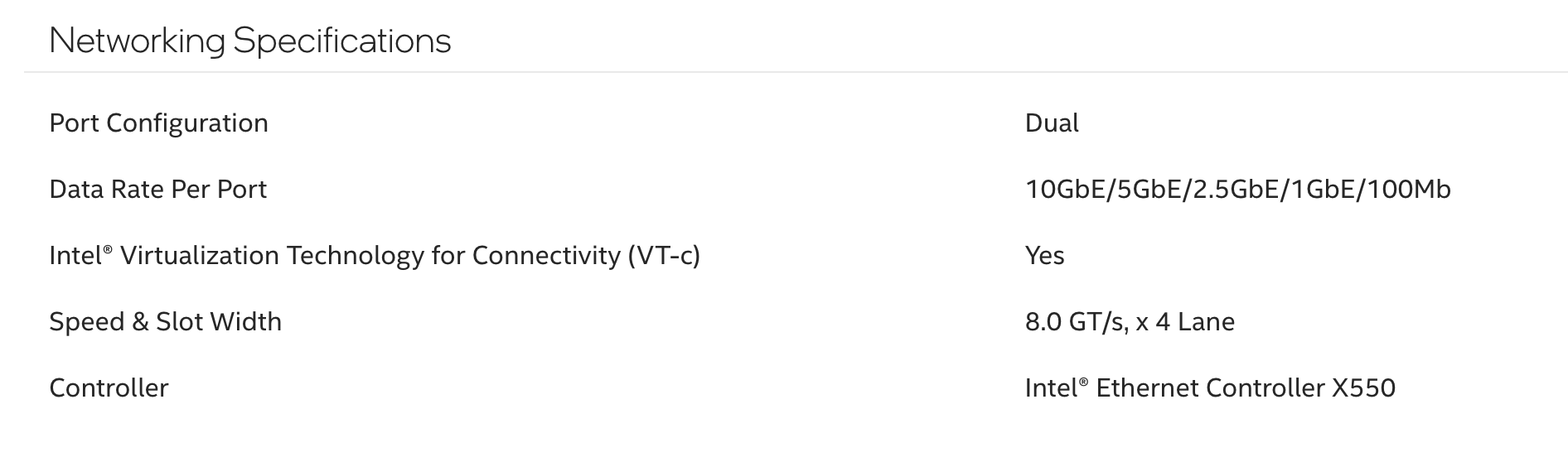
I checked the network card status by using the commands below to identify the interface and then using it to get details about the interface.
ip link showGetting the interface name
1: lo: <LOOPBACK,UP,LOWER_UP> mtu 65536 qdisc noqueue state UNKNOWN mode DEFAULT group default qlen 1000
    link/loopback 00:00:00:00:00:00 brd 00:00:00:00:00:00
2: enp9s0f1: <BROADCAST,MULTICAST,UP,LOWER_UP> mtu 1500 qdisc mq state UP mode DEFAULT group default qlen 1000
    link/ether ff:de:00:f5:aa:7a brd ff:ff:ff:ff:ff:ff
Network interfaces output
sudo ethtool enp9s0f1Getting ethtool output for X550 port 1
Settings for enp9s0f1:
	Supported ports: [ TP ]
	Supported link modes:   100baseT/Full
	                        1000baseT/Full
	                        10000baseT/Full
	                        2500baseT/Full
	                        5000baseT/Full
	Supported pause frame use: Symmetric
	Supports auto-negotiation: Yes
	Supported FEC modes: Not reported
	Advertised link modes:  100baseT/Full
	                        1000baseT/Full
	                        10000baseT/Full
	Advertised pause frame use: Symmetric
	Advertised auto-negotiation: Yes
	Advertised FEC modes: Not reported
	Speed: 1000Mb/s
	Duplex: Full
	Auto-negotiation: on
	Port: Twisted Pair
	PHYAD: 0
	Transceiver: internal
	MDI-X: Unknown
	Supports Wake-on: d
	Wake-on: d
        Current message level: 0x00000007 (7)
                               drv probe link
	Link detected: yes
ethtool output for X550 port 1
The card clearly supports intermediate speeds (2.5Gbps and 5Gbps), but these weren't being advertised. To resolve this, I created a NetworkManager dispatcher script to apply the necessary settings automatically.
NetworkManager Dispatcher Script
There might be a better way to accomplish this, but the Intel documentation is cryptic to me and this worked just fine on Ubuntu 24.04 LTS for me.
I'm using Ubuntu 24.04 which uses NetworkManager, keep that in mind if you're using another distribution.
sudo vim /etc/NetworkManager/dispatcher.d/10-ethtool-configOpen the script file for editing
Insert the contents of the script below, making sure you update it as necessary for your system. For example, my interface names are enp9s0f0 and enp9s0f1, but if you have a single-port card or the interface names from the commands above are different you will need to edit accordingly.
#!/bin/bash

# Function to apply ethtool settings to an interface
apply_ethtool_settings() {
    local interface=$1

    # Apply ethtool settings
    if /usr/sbin/ethtool -s $interface advertise 0x1800000001028; then
        logger -t nm-dispatcher "Successfully applied ethtool advertisement settings to $interface"
        return 0
    else
        local exit_code=$?
        logger -t nm-dispatcher "ERROR: Failed to apply ethtool advertisement settings to $interface (exit code: $exit_code)"
        return $exit_code
    fi
}

# Check if this is a pre-up event for our target interfaces
if [ "$2" = "pre-up" ]; then
    if [ "$1" = "enp9s0f1" ]; then
        apply_ethtool_settings enp9s0f1
    elif [ "$1" = "enp9s0f0" ]; then
        apply_ethtool_settings enp9s0f0
    fi
fi
ethtool dispatcher script
sudo chmod +x /etc/NetworkManager/dispatcher.d/10-ethtool-config
sudo sudo systemctl restart NetworkManager
Make the script executable and restart NetworkManager
Verify the Configuration
sudo ethtool enp9s0f1Settings for enp9s0f1:
Supported ports: [ TP ]
Supported link modes: 100baseT/Full
1000baseT/Full
10000baseT/Full
2500baseT/Full
5000baseT/Full
Supported pause frame use: Symmetric
Supports auto-negotiation: Yes
Supported FEC modes: Not reported
Advertised link modes: 100baseT/Full
1000baseT/Full
2500baseT/Full
5000baseT/Full
10000baseT/Full
Advertised pause frame use: Symmetric
Advertised auto-negotiation: Yes
Advertised FEC modes: Not reported
Speed: 1000Mb/s
Duplex: Full
Auto-negotiation: on
Port: Twisted Pair
PHYAD: 0
Transceiver: internal
MDI-X: Unknown
Supports Wake-on: d
Wake-on: d
Current message level: 0x00000007 (7)
drv probe link
Link detected: yesUpdated ethtool output for interface
Confirm that 2.5Gbps and 5Gbps link modes are now listed under "Advertised link modes."
This was all I needed to get auto link-speed negotiation working on my own Intel X550-T2 on Ubuntu 24.04 for all supported link speeds.